


The average apparel brand manages somewhere between 200 and 800 active SKUs at any given moment. Each one exists in a different operational state — some waiting for approval, others in production, many sitting in warehouses, a handful getting discontinued. Yet most brands track all of this in spreadsheets where a style number is just... a style number. No lifecycle visibility. No state tracking. No operational gates.
What happens? Designers modify tech-packs while factories are already cutting fabric. Merchandising teams plan markdowns on SKUs that production hasn't approved for sampling yet. Inventory planners order materials for styles that design killed three weeks ago and forgot to communicate.
The problem isn't just miscommunication. SKUs move through predictable operational stages, but nobody treats them that way. A SKU in draft needs different metadata than one in production. A style heading to phase-out requires different controls than one just hitting retail floors. Without a proper state machine framework, you're running blind through your entire product lifecycle.
Why traditional SKU tracking breaks down
Most apparel operations start simple. Design creates styles, production makes them, warehouses ship them. Works fine at 30 SKUs across one season. But watch what happens as complexity grows.
Design creates style ABC-123 and uploads the initial tech-pack. Production samples it. Merchandising reviews costs. Everyone's working off different versions of reality because the SKU exists simultaneously in multiple states depending on who you ask. For design, it's still in development. For sourcing, it's approved and ready for fabric ordering. For planning, it's already allocated to stores.
The disconnects compound fast. A typical mid-size brand might have 340 active SKUs spread across something like:
-
47 in various design stages
-
112 approved but not yet in production
-
89 actively being manufactured
-
72 in warehouses ready to ship
-
20 marked for phase-out
Each group needs different information. Design needs tech-pack versioning and sample feedback. Production needs cut tickets and quality specs. Inventory needs location data and aging metrics. Marketing needs product descriptions and imagery status. But their ERP just shows SKU numbers and basic descriptions.
Without defined lifecycle states, every department builds their own tracking system. Design keeps approval statuses in Monday.com. Production tracks manufacturing stages in Excel. Inventory runs reports from their WMS. Nobody actually knows the true operational state of any given SKU without checking three different systems and making a few phone calls.
The state machine approach
A SKU state machine treats each product as moving through defined operational stages with specific entry criteria, required metadata, and exit gates. It's not about adding complexity — it's about making the existing complexity visible and manageable.
Eliminate delays in your fashion production cycle.
GoTailo helps you manage designs, orders, and inventory effortlessly, keeping production on schedule.
- Centralized order and inventory management
- Real-time supplier communication
- Integrated production scheduling
No credit card required
Core lifecycle states
Draft State
This is where SKUs live during initial development. The style exists conceptually but hasn't been approved for any operational commitment. Tech-packs are evolving, costs are estimated, samples might be in development.
-
Designer assignment
-
Target season/delivery
-
Preliminary costing
-
Sample status
-
Tech-pack version
-
Design review notes
Exit criteria to move to Approved:
-
Final tech-pack uploaded
-
Cost sheet completed
-
Sample approved
-
Merchandising sign-off
-
Minimum order quantities confirmed
Approved State
The SKU has passed all gates and is cleared for production planning. This doesn't mean production has started — it means the business has committed to making this product.
-
Final approved tech-pack
-
Confirmed costs and margins
-
Production timeline
-
Material requirements
-
Quality standards
-
Vendor assignments
Exit criteria to move to In Production:
-
Purchase orders issued
-
Materials confirmed available
-
Production slot scheduled
-
Payment terms agreed
In Production State
Active manufacturing is underway. The SKU is consuming materials, factory capacity, and working capital.
-
Production order numbers
-
Cut dates and quantities
-
Quality inspection schedules
-
Shipment planning
-
Real-time production status
-
Defect rates and rework needs
Exit criteria to move to Live:
-
Final inspection passed
-
Shipment received at warehouse
-
System inventory updated
-
Product photography completed
-
Marketing materials ready
Live State
The SKU is actively selling through retail channels. Most metrics and KPIs focus here, but without the previous states tracked, you can't actually diagnose performance issues when they show up.
-
Inventory levels by location
-
Sales velocity
-
Return rates
-
Margin performance
-
Promotional history
-
Reorder points
Exit criteria to move to Phase-out:
-
Inventory below threshold
-
Season ending
-
Replacement SKU approved
-
Sales velocity declining
-
Quality issues identified
Phase-out State
The SKU is being discontinued. Remaining inventory needs liquidation, materials need disposition, and the style needs proper closeout.
-
Remaining inventory counts
-
Markdown schedule
-
Material disposal plan
-
Final cost reconciliation
-
Archival requirements
Below is a simple workflow showing the state transitions and gates.
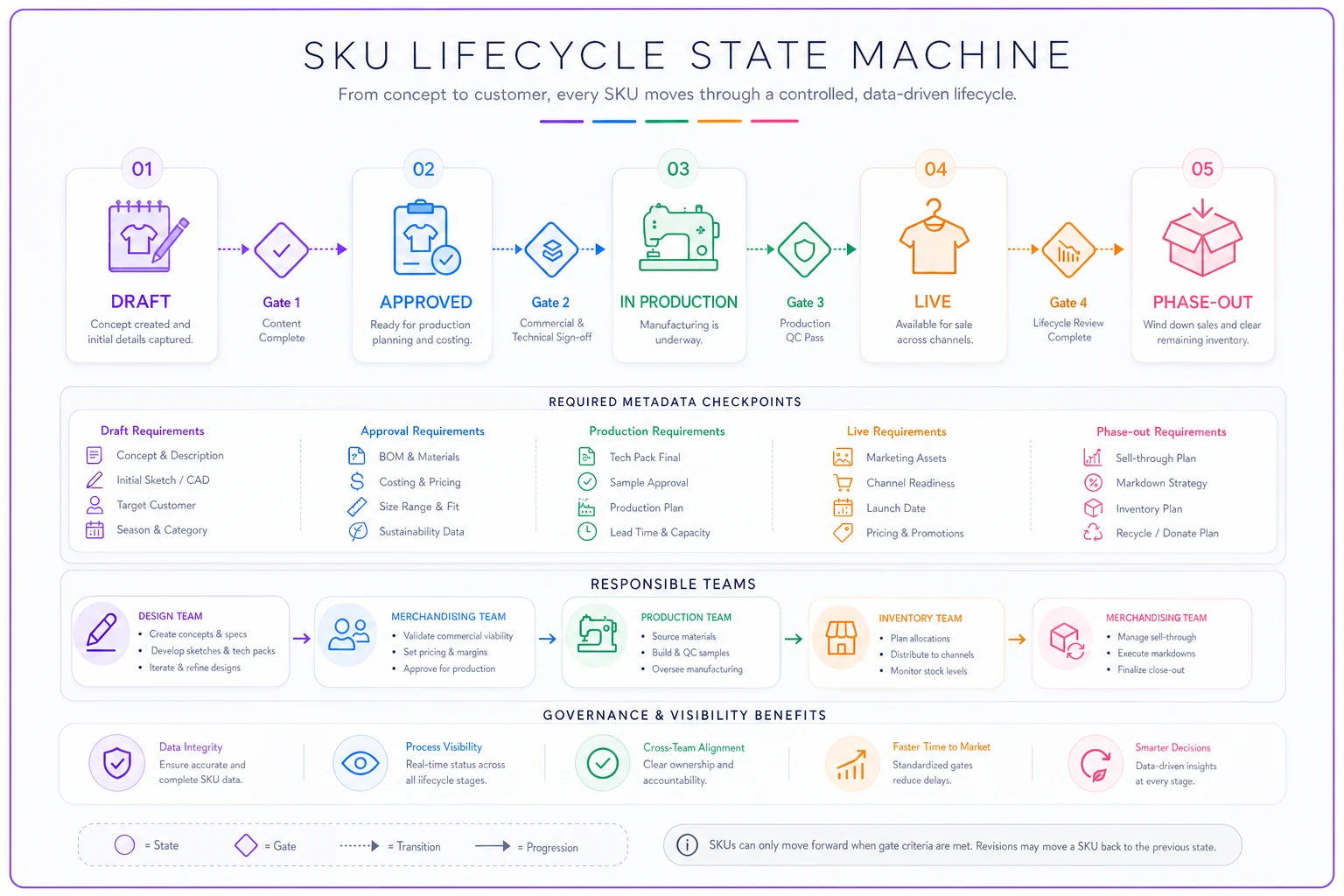
This visual maps the gates, required metadata, and responsible teams.
Once you've mapped these states out, you start seeing your product portfolio differently — not as a flat list of style numbers, but as a pipeline with distinct stages, each with its own risks and requirements.
Change control gates that actually work
The power of a state machine isn't just tracking — it's controlling what can change at each stage. Once a SKU moves from Draft to Approved, certain fields should lock. You can't modify the base tech-pack without versioning. You can't change confirmed costs without approval workflows.
Brands have lost tens of thousands because someone changed a fabric specification after materials were already ordered. The factory used the old spec, the brand expected the new one, and nobody caught it until boxes arrived at the warehouse. With proper state controls, that change triggers alerts and requires approvals before anything moves forward.
Gate examples by state transition
Draft → Approved Gate
-
Lock
Basic style attributes (category, gender, base silhouette)
-
Require
Complete BOM with supplier codes
-
Alert
Any stakeholders with pending reviews
Approved → In Production Gate
-
Lock
All technical specifications
-
Require
Signed vendor agreements
-
Verify
Materials availability confirmed
-
Alert
Design team that changes now require change orders
In Production → Live Gate
-
Lock
Product costs and margins
-
Require
Quality audit completion
-
Verify
Marketing assets uploaded
-
Alert
Sales team of arrival dates
These gates aren't bureaucracy — they're the operational guardrails that stop small oversights from becoming expensive problems at the worst possible moment.
SKU health metrics that matter
Every lifecycle state needs its own health metrics. A SKU sitting in Draft for 90 days signals a different problem than one stuck in Approved for 90 days.
State-specific KPIs
| Lifecycle State | Key Metrics | Warning Thresholds | Action Triggers |
|---|---|---|---|
| Draft | Days in draft, Sample iterations, Cost revisions | >45 days, >3 samples, >2 revisions | Escalate to design director, Review for cancellation |
| Approved | Days until production, Material lead time gaps, Vendor confirmation delays | >30 days waiting, >14 days gap, >7 days unconfirmed | Expedite materials, Find alternate vendor, Review production schedule |
| In Production | On-time completion %, Defect rates, Cost overruns | <85% on-time, >3% defects, >5% over cost | Daily status calls, Quality intervention, Margin review |
| Live | Sell-through rate, Weeks of supply, Return rate | <20% in 4 weeks, >16 weeks supply, >8% returns | Markdown consideration, Redistribute inventory, Quality investigation |
| Phase-out | Liquidation %, Carrying cost, Final margin | <50% cleared, >$X per unit/month, <X% margin | Deep markdowns, Donation/destruction, Margin analysis |
The key is connecting these metrics to actual operational decisions. When a Draft SKU hits 45 days without approval, that's not just a metric — it's consuming design resources that could go toward other products. When an In Production SKU starts showing quality issues, every day of delay hits your delivery windows and potentially your retail partnerships.
Rationalization rules that prevent SKU proliferation
Without lifecycle tracking, brands accumulate zombie SKUs — products that exist in systems but serve no operational purpose. Not selling, not being produced, just sitting there complicating inventory counts, product searches, and reporting.
A state machine enables automatic rationalization:
Aging Rules
-
Draft > 60 days without update → Auto-flag for review
-
Approved > 90 days without production → Cancel or expedite decision
-
Live > 52 weeks with velocity below 2 units/week → Phase-out trigger
-
Phase-out > 180 days → Final disposition required
Performance Rules
-
Return rate > 15% → Immediate quality review
-
Margin degradation > 20% from plan → Sourcing review
-
Sell-through < 10% in first month → Marketing/merchandising intervention
Overlap Rules
-
Similar SKU exists at better margin → Consolidation review
-
Substitute product performing better → Phase-out consideration
-
New season equivalent approved → Automatic phase-out scheduling
Most brands don't realize how many zombie SKUs they're carrying until they actually force-sort everything into states. The number is usually uncomfortable.
Real scenario: Tech-pack changes cascading to inventory
A contemporary women's brand with around 400 active SKUs implemented a basic state machine after experiencing repeated inventory disasters.
Their recurring problem: design would tweak tech-packs after approval, assuming small changes didn't really matter. A sleeve length adjustment here, a pocket placement there. Seemed minor. But these changes were happening while fabric was already cut or garments were in sewing.
One situation nearly killed their fall season. Style RD-2847, a core jacket, was Approved and moved to In Production. Three weeks into manufacturing, design decided to add a chest pocket after seeing a competitor's version. They updated the tech-pack directly, assuming the factory would see it and adjust.
The factory was already 40% through production. Half the run shipped with pockets, half without. The inventory system expected one SKU. Customer service couldn't explain why "the same jacket" looked different across orders. Returns spiked to 24% on that style alone. Total impact: roughly $47,000 in returns processing, markdowns, and lost sales.
After implementing state controls:
-
Tech-pack modifications after Approved state require a formal change order
-
Change orders automatically version the SKU (RD-2847 becomes RD-2847-V2)
-
The system alerts all stakeholders when changes occur
-
In Production changes trigger cost and timeline reforecasting
The following season, they had 7 attempted post-approval changes. The system caught all of them. Three were rejected as too late in the process. Four were approved but properly versioned and communicated. Zero inventory mismatches.
Building this without enterprise software
You don't need a massive PLM system to implement SKU lifecycle management. Most of this can run on structured spreadsheets with some basic automation. The key is discipline around state definitions and transitions.
Start with a master SKU registry that includes:
-
Current state (use dropdown validation)
-
State change date
-
Days in current state (calculated)
-
Next state requirements (checklist)
-
Blocking issues (text field)
-
State owner (responsible person)
Use spreadsheet data validation to enforce state values and avoid typos.
Add a simple weekly review process:
-
Filter all SKUs by current state
-
Sort by days in state (longest first)
-
Review anything over threshold
-
Document state transitions
-
Alert relevant teams of changes
For brands running 200–500 SKUs, this manual process takes 2–3 hours weekly but prevents countless hours of confusion and expensive mistakes downstream.
As volume grows, operational software with workflow automation handles state transitions automatically. When someone uploads a final tech-pack, the system checks if all Approved criteria are met and transitions the SKU without anyone manually moving it. When inventory drops below threshold, it triggers phase-out workflows. When states age beyond limits, it escalates to management. That automation eliminates the manual checking while maintaining the same operational discipline — and it creates audit trails that become surprisingly useful when you're trying to understand why certain products succeeded or bombed.
Common implementation mistakes
Brands mess up state machines in pretty predictable ways.
Too many states
Creating 15+ states trying to capture every micro-step is a common trap. Draft, Conceptual, In Review, Pending Approval, Conditionally Approved... This complexity kills adoption fast. Five to seven states maximum. If you need more granularity, use sub-states within main states.
Weak exit criteria
"Move to Approved when ready" isn't exit criteria. You need specific, checkable requirements. Either the cost sheet is complete or it isn't. Either merchandising signed off or they didn't. Ambiguous criteria leads to premature state transitions and downstream chaos.
No retroactive cleanup
If you've got 400 existing SKUs, you need to assign them to states before launching the new process. Otherwise you're running two systems in parallel indefinitely. Take a week, review everything, force-fit them into states. It won't be perfect, but it beats limbo.
Ignoring state ownership
Every state needs an owner — a role responsible for moving SKUs through that stage. Draft might be owned by Design. In Production by the production manager. Without ownership, SKUs stagnate because everyone assumes someone else is handling it.
The competitive advantage of lifecycle discipline
Brands that run proper SKU lifecycle management operate differently than those that don't. They can answer questions instantly: How many SKUs are awaiting approval? What's stuck in production? Which products are underperforming and need phase-out decisions?
The real advantage shows in execution speed. When every SKU has a defined state and clear next steps, decisions happen faster. There's no investigation needed to understand where something stands. No archaeology required to figure out why something is delayed.
During peak season planning, a lifecycle-driven brand can evaluate their entire product pipeline in a fraction of the time. They know what's coming, what's at risk, what's performing. Portfolio decisions get made on actual operational data, not guesswork about what might be happening in factories halfway around the world.
For smaller brands competing against larger players, this kind of operational visibility matters. You might not have their resources, but you can be more agile, more responsive, and more in control of your product flow. That translates directly to better inventory turns, higher margins, and fewer expensive surprises.
The brands still managing SKUs in flat spreadsheets — treating every product the same regardless of where it sits in its lifecycle — those are the ones calling factories at midnight trying to locate orders, discovering discontinued products still being marketed, explaining to investors why inventory write-downs keep appearing out of nowhere.
The lifecycle itself isn't complex. Draft, Approved, In Production, Live, Phase-out. Five states that every product flows through. The complexity comes from not acknowledging those states exist and trying to manage everything as if SKUs are static database entries instead of operational entities moving through time.
Build the state machine. Define the gates. Track the metrics. Control the changes. After a season or two, you'll have a hard time remembering how you managed without it.
Ready to tailor your apparel operations?
Join 500+ fashion brands using GoTailo to accelerate product launches, reduce waste, and improve supplier collaboration.