


Most apparel brands wing version control until something expensive breaks
You know that sinking feeling when your factory emails asking "which version should we use?" and you realize your tech pack naming convention is just dates and whatever made sense at 2am. Meanwhile, your pattern maker in Vietnam has V3finalFINAL while your designer in LA just sent out Spring2024techpackupdate2_revised.
The production sample arrives three weeks later with the wrong pocket placement because someone grabbed an old version from a shared drive. Now you're eating a $4,200 mistake on 600 units, all because your versioning system was basically "hope everyone's looking at the same file."
Most apparel brands stumble through tech pack version control chaos until something expensive breaks. Then they either overcorrect with some enterprise PLM system that costs $3k monthly and takes six months to implement, or they keep winging it with increasingly creative file names.
There's a middle path that actually works.
Why tech pack versioning turns into a disaster (it's not just naming)
The versioning problem starts innocently. You're a small brand, maybe doing 3-4 styles per season. Your designer creates a tech pack, emails it to the pattern maker, who marks it up and sends it back. Simple enough.
Then reality hits. Your factory requests a zipper change. The pattern maker adjusts the grading. Someone catches a measurement error. Your buyer wants different colorways. Each change creates another version floating around in someone's inbox or cloud folder.
-
Designer working off TechPackV4March15
-
Pattern maker referencing StyleABC_revision3
-
Factory using whatever PDF was in that WeChat thread from two weeks ago
-
Production manager trying to track changes in an Excel sheet that nobody updates
The real killer? Nobody knows who approved what. Your designer thinks the factory confirmed the latest measurements. The factory's waiting for final approval. Your production manager assumed the buyer signed off weeks ago.
This isn't a file naming problem. It's a governance problem dressed up as a versioning issue.
The cascading damage of version confusion
Take a small activewear brand launching their third collection — around 12 styles, working with two factories in Pakistan and Vietnam.
Eliminate delays in your fashion production cycle.
GoTailo helps you manage designs, orders, and inventory effortlessly, keeping production on schedule.
- Centralized order and inventory management
- Real-time supplier communication
- Integrated production scheduling
No credit card required
Their "system" was straightforward: designers created tech packs, uploaded to Google Drive, shared links via email. Each revision got saved as a new file with the date added. Seemed logical.
Week 3 of sampling: The Pakistan factory starts cutting based on a tech pack from February 8th. Problem is, there was a critical fit revision on February 12th that changed the rise by 1.5 inches. Nobody caught it because the email with the updated link got buried in a thread about shipping delays.
Week 5: Designer notices the sample photos look off. Emails flying. WhatsApp messages at midnight. Factory's already cut 300 units of fabric. That's $1,800 in materials, plus another week of delays while they recut.
Week 7: Vietnam factory sends their samples. Different problem — they're using the right measurements but wrong trim specs because someone forwarded an old version "for reference" and it became the working document.
Total damage across one collection:
-
3 weeks added to timeline
-
$6,400 in wasted materials and remake costs
-
2 colorways dropped because they ran out of time
-
Missed the early March wholesale deadline
Everyone was trying their best. The system failed them.
A versioning convention that actually sticks
Forget complex naming schemes. You need something the factory floor manager in Karachi can understand at 6am and your freelance designer in Brooklyn won't mess up.
Base structure:
[StyleCode][Version][Status]
That's it. Not dates. Not initials. Not department codes.
Example progression:
-
SS24-TOP01V1DRAFT
-
SS24-TOP01V2REVIEW
-
SS24-TOP01V3APPROVED
-
SS24-TOP01V3.1APPROVED (minor update)
-
SS24-TOP01V4PRODUCTION
Major versions (V1, V2, V3) = structural changes. Fit adjustments, construction method changes, new measurements, material substitutions.
Minor versions (V3.1, V3.2) = surface changes. Color updates, label placement, print positioning, trim swaps with same specs.
Status markers tell everyone where things stand:
-
DRAFT = designer working, don't use for anything
-
REVIEW = ready for feedback
-
APPROVED = signed off for sampling
-
PRODUCTION = final, factory can proceed
-
ARCHIVED = old version, kept for reference
Put dates in the version log, not filenames, and use the Base structure exactly as shown.
No dates in filenames. Dates go in the version log.
Keep this in the same folder as your tech packs. Update it immediately when creating new versions. Make it the single source of truth for version status.
Who signs off when (the governance that matters)
The naming convention means nothing without clear ownership. Small brands usually fumble here because "everyone kind of approves everything."
Stage 1: Initial Design (V1DRAFT to V2REVIEW) Owner: Designer. Creates initial tech pack. Can iterate freely on DRAFT versions. Moves to REVIEW when ready for input. No factory involvement yet.
Stage 2: Technical Review (V2REVIEW to V3APPROVED) Owner: Technical designer or production manager. Reviews measurements against grade rules. Checks construction feasibility. Confirms material availability. Gets costing from factory. Sign-off required: Written confirmation via email.
Stage 3: Sample Approval (V3APPROVED to V3.xAPPROVED) Owner: Whoever holds P&L responsibility (usually founder/buyer). Reviews physical sample. Approves fit and quality. Can request minor adjustments (3.1, 3.2 versions). Major changes trigger new major version and restart review. Sign-off required: Email with specific approval language.
Stage 4: Production Release (V3.xAPPROVED to V4PRODUCTION) Owner: Production manager. Final check of all specs. Confirms fabric/trim availability. Locks file for factory use. Sign-off required: Production order placement.
Each stage has one owner. Not a committee. Not "whoever's available." One person who says yes or no.
The lightweight version log that prevents disasters
You don't need complicated software. You need one spreadsheet that everyone actually updates.
| Style Code | Version | Date | Changed By | What Changed | Approved By | Status |
|---|---|---|---|---|---|---|
| SS24-TOP01 | V1 | Jan 15 | Sarah D | Initial design | - | DRAFT |
| SS24-TOP01 | V2 | Jan 18 | Sarah D | Added back seam | - | REVIEW |
| SS24-TOP01 | V3 | Jan 22 | Mike P | Fixed grading | Jennifer L | APPROVED |
| SS24-TOP01 | V3.1 | Jan 25 | Sarah D | Updated pantone | Jennifer L | APPROVED |
| SS24-TOP01 | V4 | Feb 2 | Mike P | Final for production | Jennifer L | PRODUCTION |
Keep this in the same folder as your tech packs. Update it immediately when creating new versions. Make it the single source of truth for version status.
The critical bit: "What Changed" column. Not essays, just the important stuff. "Increased bust 0.5 inches." "Changed to YKK zipper." "Updated main label placement."
Anyone can scan this and understand the evolution without opening 15 files.
Building version control into your workflow
The system only works if it fits how your team actually operates. Most small apparel brands work something like this:
-
Designer creates new version of tech pack
-
Saves with proper naming convention
-
Updates version log with changes made
-
Sends for review to appropriate owner
-
Owner reviews and either approves or requests changes
-
If approved, status updated to next stage
-
File shared with relevant parties
-
Process repeats until PRODUCTION status reached
Critical workflow checkpoints:
Monday morning design review meetings where all new versions from previous week get reviewed. Version log updated live during meeting.
Wednesday factory check-in calls to run through any version changes and confirm everyone has correct files.
Friday afternoon version log audits — quick scans of any styles missing approvals or stuck in REVIEW too long.
Sample arrival protocols: before evaluating sample, check version log to confirm which version was used.
Before any production order, production manager confirms PRODUCTION version exists and version log shows proper approvals.
Teams that check versions twice a week catch problems. Teams that "check when they remember" don't.
This diagram shows the core workflow and checkpoints you should enforce.
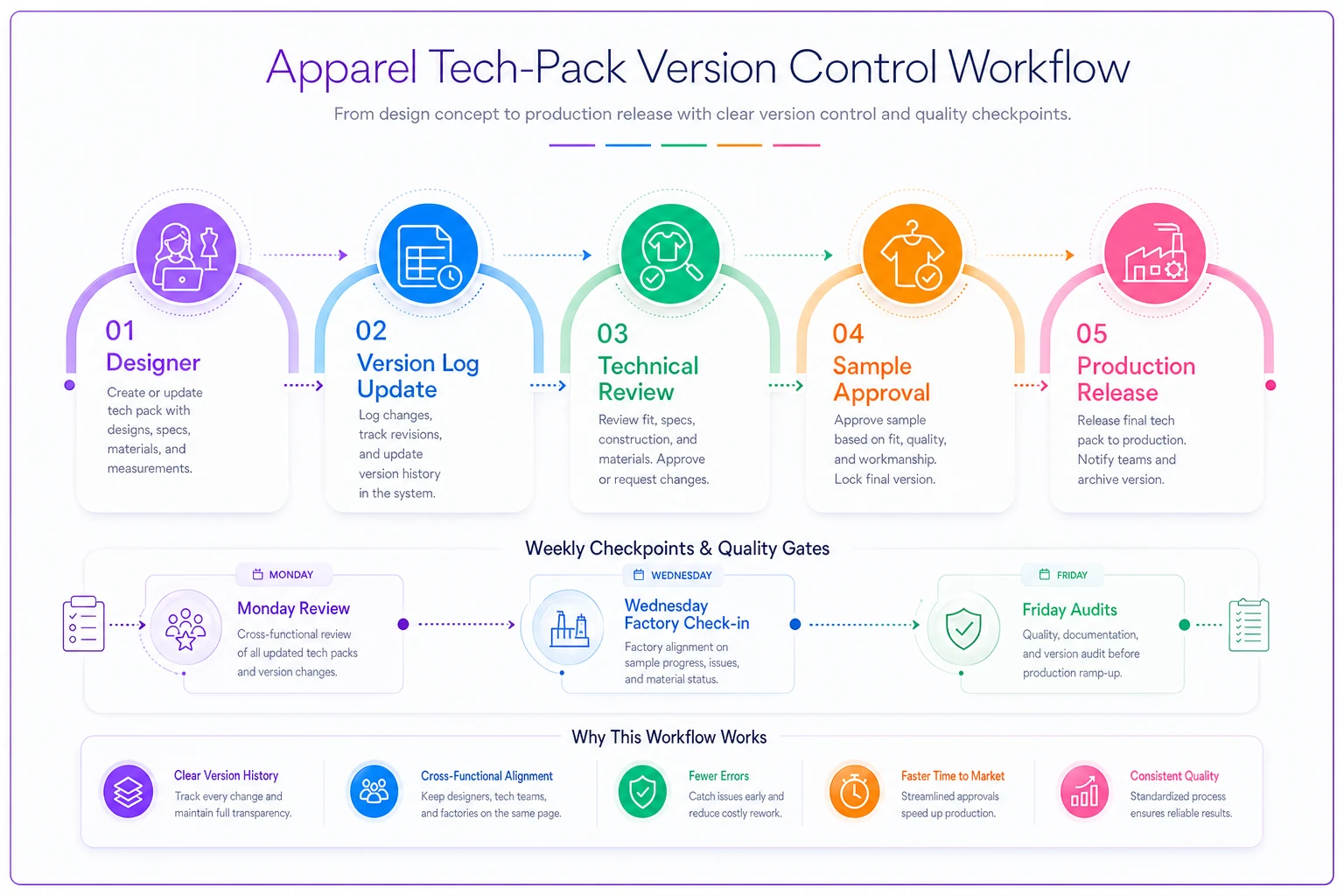
Use this workflow as a conversation tool in your Monday review to make sure everyone understands their checkpoint responsibilities.
Migration without disruption (the realistic path)
You're sitting on 200 existing tech packs with naming conventions from hell. The standard advice is "rename everything!" which is about as realistic as expecting your factory to suddenly start reading every email.
Week 1-2: Start with current development Only apply new system to active styles currently in development. Usually 10-20 files max. Create the version log for just these styles. Get everyone comfortable with the convention.
Week 3-4: Next season forward All new designs follow the system from day one. No exceptions. This is where you'll build the habit.
Week 5-8: Selective historical cleanup Only rename files that are actively used as reference, caused problems in the past, or will definitely be reordered.
Everything else stays as-is but gets marked ARCHIVED.
The 80% rule: If you get 80% of your active files following the convention, you've solved 95% of your problems. Don't burn weeks pursuing perfection.
Rollback procedures when things go sideways
Sometimes you approve V4, send it to production, then realize V3 was actually correct. Without a rollback plan, this turns into emails asking "can someone send me the version from last Tuesday?"
The three-step rollback:
-
Immediate communication Stop work order to factory (WhatsApp + email). Clear subject line: "STOP - Use Different Version - [Style Code]"
-
Version swap Don't delete the wrong version. Copy the correct old version. Rename with new major version number (V5). Update status to PRODUCTION. Add clear note in version log: "Rollback to V3 specs"
-
Confirmation loop Factory confirms receipt and understanding. They send photo of the tech pack they're using. You verify it's correct version. Document in version log.
Common rollback scenarios include buyers changing minds after approval, samples revealing fit issues not caught in tech pack, cost engineering requiring reverting to simpler construction, and material availability forcing return to original spec.
Treat rollback as a new version, not trying to pretend the mistake didn't happen.
When this system breaks (and what to do)
The midnight revision problem: Designer sends "quick update" directly to factory via WhatsApp at 11pm, bypassing versioning entirely. Factory starts working off a screenshot.
Fix: Morning reconciliation rule. Any overnight changes must be formalized into versioned tech pack by 10am next business day.
The sample room improvisation: Sample maker fixes an obvious problem during construction, doesn't document it. Production runs with original flawed spec.
Fix: Sample annotation requirement. Physical samples returned with a printed copy of the tech pack, handwritten notes on any deviations. These become V3.1, V3.2 updates.
The buyer's "small request": Sales shows buyer a sample, buyer wants "just a tiny change" - maybe button color or label position. Seems too minor for new version, gets communicated verbally, gets forgotten.
Fix: No verbal changes policy. Every change, no matter how small, gets versioned. Use minor version numbers liberally.
The parallel development trap: Two people working on updates simultaneously, creating V4 from different V3 baselines.
Fix: Check-out system via version log. Add "Currently Editing" column. Only one person can move a style from APPROVED to new version at a time.
Making it stick with distributed teams
The hardest part isn't creating the system — it's getting your pattern maker in Vietnam, your designer in LA, and your factory in Pakistan all following it.
Week 1 adoption tactics:
-
Send a one-page visual guide. Not a manual. One page showing the naming convention with examples, who approves what, and where to find the version log.
-
Record a 5-minute screen video walking through the process. Show yourself actually renaming a file, updating the log, getting approval. Send to everyone, including factories.
Week 2-4 enforcement: Gentle correction period. When someone sends wrong version or uses old naming, acknowledge the work, fix the versioning yourself, show them what you changed.
Month 2 onwards: Start rejecting work with wrong versioning. Factory sends sample report with old version reference? Send it back for correction. Designer submits tech pack with date-based naming? Return for proper versioning.
The enforcement feels awkward but prevents the $6,400 mistakes.
The tools question (without the enterprise overhead)
Most brands eventually ask about software. The progression usually goes:
-
Email and folders (chaos)
-
Google Sheets and Drive (works until around 50 styles)
-
Notion or Airtable (works until maybe 200 styles)
-
Enterprise PLM (overkill for most)
The sweet spot for brands doing under $5M annually sits somewhere between steps 2 and 3. You need central file storage everyone can access, version tracking that's better than filenames, basic approval workflows, and search that actually works.
The key functionality that matters:
-
Automatic version numbering when files update
-
Approval tracking with timestamps
-
Rollback to any previous version
-
Comments tied to specific versions
-
Mobile access for factory floor checks
Whether you build this workflow in existing tools or adopt purpose-built software, the principles stay the same. Clear naming, single ownership, documented changes, rollback procedures.
The reality check on version control for small brands
Small apparel brands that survive scale have boring, simple systems that everyone actually follows. The ones who struggle have either no system or overly complex systems that people bypass.
Your version control system should take less than a week to implement and less than a minute per file to maintain. If it's more complex than that, it won't survive your busy season when everyone's stressed and cutting corners.
These naming conventions, governance rules, and rollback procedures work for brands doing anywhere from $200k to $8M annually. They work because they match how apparel development actually flows, not how software companies think it should flow.
Start with your next tech pack. Use the naming convention. Update the version log. Get one clean approval. Then do it again. By the time you hit your fifth style, it'll feel natural. By your twentieth, you'll wonder how you ever worked without it.
When that factory email arrives asking "which version should we use?" you'll know exactly which one, who approved it, and when. That confidence is worth more than any PLM system.
Ready to tailor your apparel operations?
Join 500+ fashion brands using GoTailo to accelerate product launches, reduce waste, and improve supplier collaboration.