

The worst part of a supplier outage isn't the outage itself. It's the first six hours after, when three people are all "handling it" and nobody actually owns the decision. Your dyehouse emails at 11pm about a boiler failure. Your production lead sees it at 7am. Merchandising finds out at 10am when they ask why the fit samples aren't moving. By lunch you've lost half a day and nobody has pulled a single file.
For most SKUs, that lost half-day doesn't matter. For a time-critical launch — a collab drop, a wholesale window with a chargeback clause, a marketing calendar that's already burned ad spend — it's the difference between shipping and eating the whole program.
This is a supplier failover checklist for apparel built specifically for the 48–72 hour window. Not a broad resilience strategy — we've written about the longer-horizon capacity-profiled design and tactical failover approach elsewhere. This is the fire drill. What to grab, in what order, who decides, and what to tell people so a backup factory can actually start cutting.
The real problem: your backup factory can't start without artifacts you haven't packaged
Here's the pattern that kills failovers. A brand has a secondary supplier lined up "just in case." Good. But when the outage hits and they call that backup, the backup asks for the tech-pack, approved trims, color standards, and graded specs — and the brand spends two days assembling those from a shared drive, three email threads, and one person's memory.
The backup wasn't the bottleneck. The handoff package was.
In real operations, the artifacts exist. They're just scattered. The approved lab dip lives in someone's inbox. The final trim card is a photo on a phone. The graded pattern is buried in a version folder with four files named final, finalv2, FINALusethis, and finalactual. When you're not under pressure, you tolerate this because the primary factory already has everything. A failover exposes exactly how much institutional knowledge never got written down.
So the first job isn't logistics. It's producing a clean, ordered artifact package that a factory which has never seen this SKU can actually start from cold.
Hour 0–6: Assemble the handoff package in strict order
Don't grab everything at once. There's a priority order, because the backup factory needs certain things to quote and commit, and other things to actually produce. Getting the first group out fast is what buys you the commitment.
Eliminate delays in your fashion production cycle.
GoTailo helps you manage designs, orders, and inventory effortlessly, keeping production on schedule.
- Centralized order and inventory management
- Real-time supplier communication
- Integrated production scheduling
No credit card required
Group A — needed to get a yes/no and a start date (grab first):
-
Tech-pack, single locked version. One file, clearly dated, with a note stating "this supersedes all prior." If you have version chaos, resolve it now in favor of whatever the primary factory was actually building — not the latest edit that never got formally approved.
-
Approved color standards. Physical Pantone TCX references or the approved lab dip with the measured Delta-E tolerance you accepted. A hex code is not a color standard and any decent factory will tell you exactly that.
-
Approved trims and a trim card. Every zipper, snap, drawcord, label, and thread with supplier, color, and size. Note which trims you already have inventory of versus which the backup must source themselves.
-
Graded spec sheet with POM (points of measure) and tolerances. The measurement chart your QC team actually inspects against.
-
Quantity per size, per colorway, and the hard ship date. The backup needs to know whether your volume even fits their open capacity.
Group B — needed once they commit (grab in parallel if you have the hands):
-
Approved fit sample photos or the sealed sample itself, shippable overnight.
-
Marker/pattern files in their format, or a note that patterns need to be re-graded from spec.
-
Fabric
on-hand roll inventory, location, whether it can be transferred, or the mill contact if the backup must buy.
-
Prior defect history on this SKU — what went wrong last run so the new factory doesn't repeat it.
The thing most teams miss: Group A is a quoting package, not a production package. You don't need pattern files to get a factory to say "yes, we have three lines open Thursday." You need the tech-pack, colors, trims, spec, and quantity. Sending everything at once actually slows the yes down because it looks like a bigger lift than it is.
Quick visual of the failover workflow:
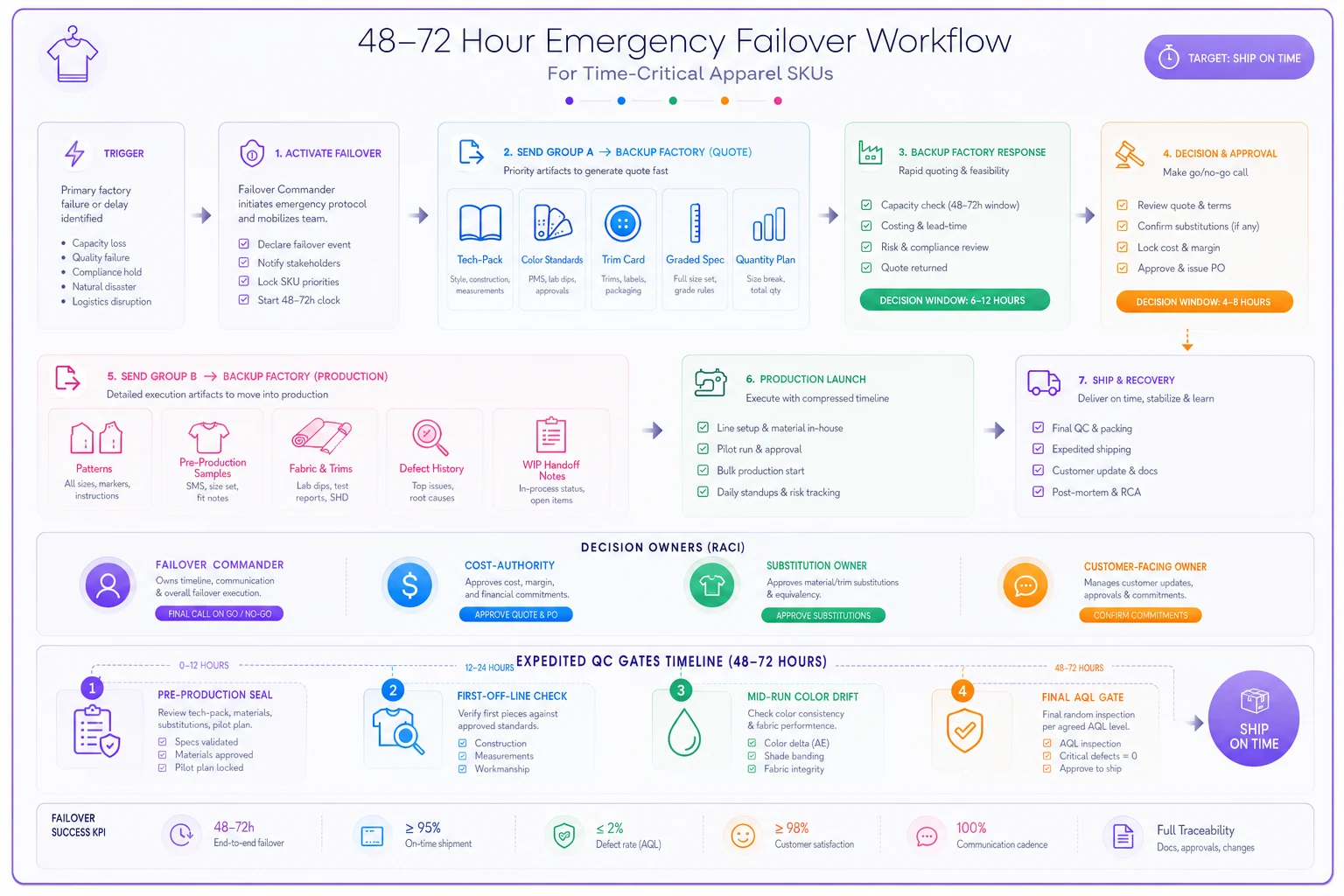
Use this to align who grabs what first.
The artifact package, at a glance
Most failures aren't missing information — they're unpackaged information. The table below maps out who owns what and where things tend to fall apart. Worth reviewing before an outage, not during one.
| Artifact | Priority | Who owns it | Common failure point |
|---|---|---|---|
| Locked tech-pack | A | Design / Tech lead | Multiple "final" versions, no clear supersede note |
| Color standards + Delta-E tolerance | A | Materials / Color lead | Only a hex code exists; lab dip approval is in email |
| Trim card + trims on hand | A | Materials lead | Trim photo on a phone; no supplier contacts |
| Graded spec + POM tolerances | A | Tech lead | Ungraded, base size only |
| Qty per size/color + ship date | A | Merch / Production | Nobody has the confirmed PO quantity handy |
| Sealed/approved fit sample | B | QC lead | Sample is at the dead factory |
| Pattern / marker files | B | Tech lead | Wrong format, needs re-grade |
| Fabric on-hand + location | B | Materials lead | Can't confirm if rolls are transferable |
Running through this once — just the ownership column — often reveals two or three places where nobody is actually the owner. That's what you want to find out now, not at hour three of a live outage.
Decision owners: assign these before you need them
The delay in most failovers is a decision vacuum, not an information vacuum. Somebody has to be allowed to say "yes, spend the money, use the backup, accept the substitution" without waiting for a meeting. Name these four roles now, with phone numbers attached.
-
Failover commander. One person who runs the 72 hours and has authority to trigger the backup. Usually the production manager. Everything routes through them.
-
Cost-authority owner. Whoever can approve the premium — the higher unit cost at the backup, expedited freight, air over ocean. Give them a pre-approved ceiling so they're not escalating mid-crisis. Something like "up to 20–25% total landed premium on this SKU, no further approval needed."
-
Substitution owner. Someone who can approve a trim or fabric substitution against a defined tolerance. Usually the design or materials lead. Without this role, a backup factory sits idle waiting to hear if you'll accept the YKK #3 instead of the #4.
-
Customer-facing owner. Whoever talks to the wholesale account or the marketing team about revised dates. You will need to have that conversation, and it shouldn't be improvised.
The cost-authority owner is the one people forget to name, and it's the one that stalls everything. When there's no pre-set ceiling, every extra dollar becomes a debate — and debates during a 72-hour window cost more than the premium ever would have.
Hours 6–24: Expedited QC gates that don't skip what matters
The temptation in a rushed failover is to skip inspection to save time. That's how a rescue turns into a full return. But a normal QC cadence — inline, mid, final, AQL — is too slow for this window. You need compressed gates that protect against the failures a new factory is most likely to introduce.
-
Pre-production seal, within 12 hours of start. Before they cut the bulk, the backup makes one sew-off in the correct fabric. Someone approves it on a video call against the sealed sample. This single gate catches the majority of misinterpretation risk.
-
First-off-line check, first 20–30 units. Inspect color match to standard, all POMs against tolerance, trim placement. If something's off, you've lost 30 units, not 3,000.
-
Mid-run color drift check. Especially on dyed goods — confirm the shade hasn't shifted between fabric rolls or dye lots.
-
Final AQL, tightened. Run a stricter AQL than normal on this run. A new factory on a rush job earns less benefit of the doubt.
The point isn't more inspection — it's earlier inspection. On a normal run you can afford to find a problem at final. On a 72-hour failover, a problem at final means there's no time left to fix it. Every gate above is designed to catch errors while there's still runway.
Communications templates: the messages you don't want to write during a crisis
Write these before an outage ever happens. During one, you'll be too busy and too stressed to write them well. Three templates cover almost everything.
> "Emergency production request for [SKU], [qty] units, hard ship [date]. Attached: locked tech-pack, color standards, trim card, graded spec. Can you confirm capacity and a start date within [X hours]? Full artifact package and sample to follow on your yes. Cost premium pre-approved on our side — please quote honestly."
> "We've had a supplier disruption on [SKU]. We've already activated a backup production plan and are protecting your [date] window. If anything about that changes, you'll hear it from me first — not from a missed delivery. Current status: [on track / revised to X]."
> "[SKU] is in failover. [Name] is commander. Cost ceiling is [X]. Substitution decisions go to [name]. Don't contact the backup factory directly — route through [commander] so we send one clean message, not five conflicting ones."
That last line matters more than it looks. The fastest way to blow up a failover is five people emailing the backup factory independently with slightly different specs. The factory doesn't know which version to build, so they wait — and waiting is the one thing you can't afford.
Contingency shipping: decide the trade before the goods are done
Freight decisions made in a panic are expensive twice — once at the counter, and again when you realize you paid for air on a delivery that had slack all along. Map the options against your remaining runway now, so the choice is arithmetic, not adrenaline.
| Runway remaining | Shipping option | Realistic transit | When it makes sense |
|---|---|---|---|
| 10+ days | Standard ocean/expedited ground | 8–14 days | Backup is domestic or you genuinely have buffer |
| 5–9 days | Consolidated air | 3–5 days | Enough units to justify air, hard date can't move |
| 2–4 days | Direct air, split shipment | 1–3 days | Launch-critical, chargeback risk exceeds freight cost |
| Under 2 days | Courier / hand-carry on partial qty | 1–2 days | Ship what's ready, backfill the rest |
The split shipment is the underused move. If 60% of the run is done and the launch is three days out, air the finished 60%, launch with it, and follow with the rest on a cheaper mode. You protect the on-sale date without paying air on the entire quantity. A lot of teams treat the run as all-or-nothing and overpay because of it.
A real scenario: the collab drop that almost missed its date
A small streetwear label had a licensed collab hoodie — roughly 2,400 units — tied to a specific launch date with paid media already booked. Their printer's screen-print line went down four days before goods were due at the fulfillment center.
Because the artifact package wasn't ready, they lost most of the first day just hunting for the approved ink Pantones and the final placement file. The print positioning only existed as marked-up photos on the art director's laptop. That delay was completely self-inflicted.
Once they got a clean package to a backup printer, things moved. Pre-production seal approved on a video call the next morning. First-off-line check caught the print sitting about an inch too high — fixed before the bulk ran. They air-shipped roughly 1,500 finished units to hit the on-sale date and followed with the balance two days later on ground.
The total landed premium came to somewhere around 18–22% over the original plan, mostly freight. Painful, but the alternative was refunding a sold-through drop and torching the ad spend. The lesson they took away wasn't "have a backup printer" — they already had one. It was that the day lost hunting for files was the only day they couldn't afford to lose. Everything after the package was assembled went roughly to plan.
When a failover is the wrong call
Not every outage justifies this. Running the full 72-hour drill on a SKU that isn't time-critical wastes money and burns your team's credibility for the next real emergency.
Skip the failover and just reschedule when:
-
The delivery window has real slack and the customer won't chargeback.
-
The premium wipes out the SKU's margin entirely — you'd be losing money to ship it.
-
The outage is short and confirmed. If your factory is back in 48 hours, riding it out often beats onboarding a new one.
-
The backup can't match critical specs and the substitution would visibly change the product.
Failover is for the SKUs where missing the date costs more than the premium. That's a small subset of what you make. Knowing which SKUs qualify — before anything breaks — is half the battle, and it connects directly to understanding how your vendor lead times actually behave under stress.
Keeping the package ready between crises
The whole checklist collapses to one durable habit: for your genuinely time-critical SKUs, keep the Group A artifact package assembled and current, with owners named and a cost ceiling pre-approved. Not for every style — that's overhead you don't need. Just the launches where a missed date is a real financial event.
Store Group A artifacts in a single governed folder with a named owner so you can pull the quoting package in minutes.
Teams that keep tech-packs, approved trims, color standards, and version control in one governed place instead of scattered across drives and inboxes have a structural advantage here. The handoff package is already built — it's just a matter of pulling it together. That's less about any particular tool and more about the discipline of keeping the record somewhere with an actual owner rather than spread across five people's memory.
The failover itself is straightforward once the package exists. Send Group A, get a start date, follow with Group B and the sample, gate the QC hard and early, and make the freight call based on runway math instead of panic. The 72 hours only feel chaotic when you're assembling the answers instead of already having them.
Ready to tailor your apparel operations?
Join 500+ fashion brands using GoTailo to accelerate product launches, reduce waste, and improve supplier collaboration.