


Most migration failures in apparel don't happen because the new software is bad. They happen because someone treated the switch as an IT project instead of a production event. The PLM goes live the same week a seasonal drop hits the cutting floor, nobody mapped how old style numbers translate to the new system, and three weeks later your planners are keeping a shadow spreadsheet because they don't trust the data.
That's the pattern worth fixing. A real apparel technology migration playbook isn't about picking the "best" platform — it's about sequencing the change so the business keeps shipping while the system underneath gets swapped out. The vendor's rollout plan is built around their deployment convenience and their revenue recognition. Yours needs to be built around your production calendar, your cutover risk, and your ability to roll back the moment something breaks.
This is the version that puts outcomes first and ignores vendor marketing entirely.
Why apparel migrations break differently than other industries
A SaaS company migrating a CRM can afford a rough week. Apparel can't. Your data isn't abstract — it's attached to fabric that's already cut, POs already placed, and shipment windows that retailers will chargeback against if you miss them. When a migration stalls, it doesn't just annoy people. It leaks into lead times, sampling, and costing.
-
Seasonal cadence. There is no "quiet period." The moment one season ships, the next is already in development. Any migration has to slot into a narrow gap, usually post-shipment, pre-development.
-
Cross-functional data. A single style touches design, tech packs, BOMs, costing, sourcing, QC, and logistics. Migrating one module without the others creates orphaned data everywhere.
-
External dependencies. Your factories and mills are often reading from the same systems. If your migration changes how a PO looks or how a tech pack is versioned, that disruption travels down your supply chain.
The teams who fail aren't the ones with weaker software. They're the ones who underestimated how many downstream workflows quietly depended on the old system's quirks.
The vendor-bias trap
Most migration plans are written by the vendor you're migrating to. That plan will almost always:
Eliminate delays in your fashion production cycle.
GoTailo helps you manage designs, orders, and inventory effortlessly, keeping production on schedule.
- Centralized order and inventory management
- Real-time supplier communication
- Integrated production scheduling
No credit card required
-
Compress the timeline (faster go-live = faster payment milestones)
-
Downplay data cleansing effort (your problem, not theirs)
-
Assume your team has more availability than it does
-
Skip rollback planning entirely, because rollback implies their product might fail
None of this is malicious. It's just incentive misalignment. A vendor-neutral plan assumes you might need to reverse the migration at any gate and builds the whole sequence around that assumption. If you can't roll back cleanly, you don't have a migration plan — you have a bet.
The rest of this article is structured around that principle: phased, gated, reversible, and tied to business outcomes rather than software features.
Phase the migration around production, not calendar dates
Migrations shouldn't move on fixed dates. They should move through gates — defined checkpoints where you decide to proceed, pause, or roll back based on evidence, not optimism.
Here's a phasing model that holds up across different team sizes:
| Phase | Primary goal | Rollback still possible? | Production exposure |
|---|---|---|---|
| 0 — Readiness | Data audit, owner mapping, test environment live | N/A | None |
| 1 — Parallel data load | New system populated, old system still authoritative | Yes (delete new) | None |
| 2 — Shadow run | Both systems used; old is source of truth | Yes (easy) | Low |
| 3 — Limited cutover | One product category runs live on new system | Yes (gated) | Medium |
| 4 — Staged rollout | Categories migrated one at a time | Partial | Medium–High |
| 5 — Decommission | Old system archived, read-only | No | High |
The key discipline: you never jump a phase to hit a date. If Phase 2 shadow run surfaces data mismatches, you fix them before touching Phase 3. The whole point of staging is to make the expensive mistakes cheap by catching them while the old system is still carrying the business.
A typical mistake looks like this: a mid-sized brand decides to migrate their entire style library in one weekend because the vendor's onboarding specialist had availability Friday. Monday morning, costing can't pull material rates because the BOM unit-of-measure fields didn't map. Now every open order is stuck, and there's no clean path back because the old system was already switched off.
Visualize the phase gates, rollback options, and production exposure to keep the sequence clear for stakeholders.
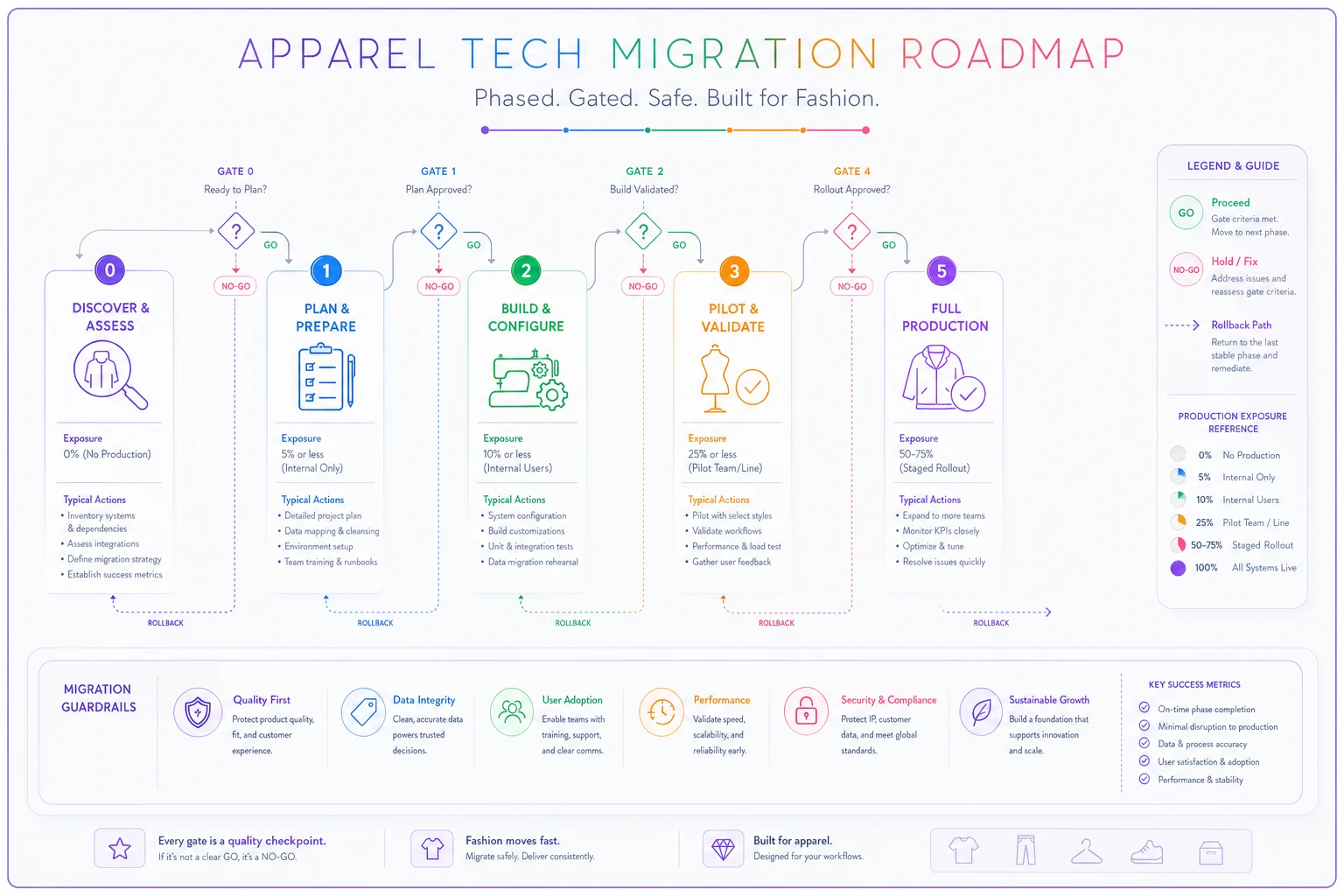
Use this as a quick reference when planning gate criteria and rollback responsibilities.
Phase 0: readiness and the data audit nobody wants to do
Before anything moves, you need to know what you're actually migrating. This is the least glamorous phase and the one most teams rush.
The readiness work breaks into three questions:
-
What data exists, and who owns it? Every data domain — styles, BOMs, suppliers, costing, measurements — needs a named owner who signs off that it's clean enough to move. If no one owns supplier records, those records will migrate broken.
-
What's the current state of quality? Duplicate style numbers, inconsistent color codes, abandoned draft tech packs. All of it comes with you unless you decide otherwise.
-
What business rules are baked into the old system? The naming conventions, the approval sequences, the version control habits. These don't live in a manual — they live in people's heads.
This is where having solid operational data governance already in place makes a migration dramatically easier. If your owners, audit routines, and reconciliation habits exist before you migrate, Phase 0 is a confirmation exercise. If they don't, Phase 0 is the moment you find out your data was never governed at all — right when you can least afford that discovery.
Same goes for tech-pack structure. Teams that already run lightweight naming and sign-off rules for tech packs migrate cleanly because their files map predictably. Teams with "Finalv3REALusethis.pdf" chaos spend weeks untangling which version is authoritative before a single record moves.
Test scripts: prove the system works with YOUR data
Vendor demos use clean demo data. Your business runs on messy real data. A migration test script forces the new system to prove it handles your actual edge cases.
Write test scripts as concrete, repeatable scenarios tied to real workflows — not feature checkboxes. A few worth building:
-
Style-to-ship walkthrough Take one real style and drive it end to end — tech pack → BOM → costing → PO → QC checkpoint → shipment record. Does every handoff carry the right data?
-
Multi-colorway test Load a style with 6 colorways and confirm material consumption calculates correctly per color, not just the base.
-
Historical reorder Pull a style from two seasons ago and confirm you can reorder against it without rebuilding the record.
-
Permission boundary test Confirm a factory user sees only what they should, and can't edit costing fields.
-
Reconciliation test Run the same costing calculation in old and new systems. The numbers must match, or you need to know exactly why they don't.
The rule: a test script isn't passed until it produces the same business outcome as the old system, or a demonstrably better one. "The feature exists" is not a pass. "The costing came out to the same figure" is.
Rollback gates: the part vendors skip
Every phase transition needs a rollback gate — a predefined checkpoint with a go/no-go decision and a documented way back. Without these, teams drift forward past the point of safe return and only realize it when something's already broken in production.
A rollback gate needs three things defined in advance:
-
Pass criteria. What specific, measurable conditions must be true to proceed? (All test scripts pass, reconciliation variance under a set threshold, owner sign-offs collected.)
-
Rollback trigger. What conditions force a reversal? (Data integrity failure, critical workflow broken, factory can't receive POs.)
-
Rollback procedure. The actual steps to return to the previous state — who does what, in what order, and how long it takes.
Here's a sample rollback checklist for a limited cutover gate:
-
[ ] Confirm old system still holds complete, current data for the migrated category
-
[ ] Verify no production orders were created only in the new system during the test window
-
[ ] Re-point any integrations (factory portals, costing exports) back to old system
-
[ ] Notify all affected users — design, sourcing, QC — that the category reverted
-
[ ] Document exactly why rollback was triggered, with evidence
-
[ ] Hold a review before re-attempting; don't just retry the same cutover
The teams that build these before go-live almost never need the full procedure — because the discipline of writing it forces them to spot risks early. The teams that skip it are the ones scrambling at 11pm trying to remember whether the old system was switched to read-only.
Staged rollout: migrate by category, not all at once
Once you've validated with a limited cutover, resist the urge to flip everything. Staged adoption means migrating one product category or one business unit at a time, letting each stabilize before moving the next.
-
Pick the lowest-risk category first. Usually a stable, repeating program — not your hero seasonal drop. You want something forgiving for the first live run.
-
Run it live for one full cycle. Let one category go through its complete rhythm on the new system before adding more.
-
Capture the friction. Every workaround someone invents, every field people fill in wrong — that's your training and configuration backlog for the next category.
-
Fix before you expand. Resolve the top issues before migrating category two. Otherwise you multiply the same problem across the whole catalog.
-
Accelerate as confidence builds. The first category might take a full season. By the fourth, you'll move categories in weeks because the playbook is proven.
A big-bang cutover means every problem hits every product simultaneously. Staged means problems stay contained, and each category migration is lower-risk than the last because you've already learned the failure modes.
A realistic migration scenario
Consider a contemporary womenswear brand running roughly 400–500 active SKUs a season, moving off a patchwork of spreadsheets and an aging PLM onto a unified platform.
Before: Their planned migration was a single weekend "lift and shift." First attempt, they loaded everything, discovered BOM units didn't map, and costing was off across roughly a third of styles. They burned about three weeks keeping shadow spreadsheets while the new system sat half-trusted.
What changed: They reset to a phased approach. Phase 0 data audit took around two weeks and surfaced close to 60 duplicate or orphaned style records nobody knew about. They ran a shadow period on one basics category, built test scripts off real styles, and set a reconciliation gate — costing variance had to be under a small threshold before cutover.
After: The basics category went live clean. They staged the remaining categories over the next two cycles. No missed shipment windows during the transition, and the shadow-spreadsheet habit disappeared because the data earned trust before it carried production weight. Total elapsed time was longer than the original "one weekend" plan — but it actually finished, which the weekend plan never did.
That tradeoff is the whole point. Phased migration looks slower on paper and is faster in reality, because it doesn't collapse.
When this makes sense — and when it doesn't
When a phased, gated migration is worth it:
-
You run continuous seasonal production with no true downtime
-
Your data touches multiple functions and external partners
-
A missed window triggers chargebacks or cancelled orders
-
You've been burned by a rushed go-live before
When lighter-weight is fine:
-
You're a very small team with a handful of styles and clean data
-
The new system is replacing something with almost no downstream dependencies
-
You can genuinely absorb a week of disruption without hitting a ship date
Who should NOT attempt a big-bang cutover, period:
Any team where a single broken day means a retailer chargeback or a cancelled PO. If your margin can't absorb a stalled window, you cannot afford an all-at-once switch — full stop. The staged approach isn't about being cautious for its own sake; it's matching migration risk to the actual cost of failure.
The governance that holds it all together
A migration isn't done when the new system goes live. It's done when the old system is decommissioned, the data is reconciled, and the team has stopped maintaining workarounds. That last part is where governance matters most.
-
A single migration owner with authority to call go/no-go at each gate — not a committee that negotiates every decision.
-
A living issues log tracking every data problem, who owns it, and its status.
-
Reconciliation routines that compare old and new outputs until you're confident they match.
-
A decommission gate that only closes when nobody is using the old system for real work.
The brands that get migrations right treat them as production events with rollback safety, not software projects with a launch date. They move slower through the dangerous parts and faster through the proven ones. And they never switch off the old system until the new one has earned the trust of the people who have to ship product next season.
That's the real playbook — not which vendor you choose, but how carefully you sequence the switch so the business never stops moving while the ground shifts underneath it.
Ready to tailor your apparel operations?
Join 500+ fashion brands using GoTailo to accelerate product launches, reduce waste, and improve supplier collaboration.