


Most small apparel factories don't skip cycle counts because they're lazy. They skip them because a full physical count means stopping sewing, pulling operators off machines, and losing half a day of output to count bundles that will move again by tomorrow morning. So the count gets pushed. Then pushed again. Then it becomes a quarterly panic where three people spend a weekend reconciling a system that's been drifting for months.
The drift is the real problem. By the time you notice, you've already cut against fabric you didn't have, promised delivery on units stuck in a rework pile, and paid for a reorder of trims sitting in a bin nobody logged. This post is about a lighter alternative — a WIP reconciliation routine tied to how fast SKUs actually move, so you count the things that matter more often and leave the slow stuff alone.
Why full cycle counts fail on a sewing floor specifically
Standard cycle count advice comes from warehouses and distribution centers, where a SKU sits on a shelf and stays put. Apparel WIP doesn't work like that. A bundle of 40 fronts can move from cutting to sewing to a rework table to pressing in a single shift. Count it at 9am and it's somewhere else by 11am — your count is already wrong before you finish writing it down.
When factories try to apply generic cycle-count logic to a live cut/sew floor, two things happen:
-
The count never matches because WIP moved during the count itself
-
Operators stop trusting the numbers, so nobody uses them
The fix isn't counting more carefully. It's counting by zone and by velocity instead of by SKU location. You freeze a zone, count what's physically in it, and reconcile against what the system says should be in that zone — not against a total inventory number that assumes nothing moves.
That shift — zone-based instead of location-based — is what makes cycle count WIP apparel actually workable in a small factory.
Sort your SKUs by velocity before you build any schedule
Not every SKU deserves the same counting attention. A basic tee running 2,000 units a week burns through fabric and generates errors fast. A slow seasonal jacket moving 30 units a month barely changes between counts.
Eliminate delays in your fashion production cycle.
GoTailo helps you manage designs, orders, and inventory effortlessly, keeping production on schedule.
- Centralized order and inventory management
- Real-time supplier communication
- Integrated production scheduling
No credit card required
| Velocity band | Weekly WIP flow | Count frequency | Why |
|---|---|---|---|
| Fast movers | 800+ units/wk | Every 2–3 days | High error accumulation, fabric burn, most reorder risk |
| Steady | 150–800 units/wk | Weekly | Moderate drift, worth watching but not urgent |
| Slow / seasonal | Under 150 units/wk | Monthly | Barely moves, drift accumulates slowly |
The point of this table isn't the exact thresholds — set those against your own volume. The point is that a small factory running 40–60 active SKUs cannot count everything every week and shouldn't try. If you count your top eight fast movers three times a week and rotate everything else through, you catch roughly 80% of the value drift while touching a fraction of the SKUs.
One pattern worth noting: the SKUs that generate the most WIP variance are almost never the ones production managers are worried about. They watch the tricky new style closely. But the boring high-volume basic — running unattended, cut in big batches — is where 60 units quietly disappear into a rework pile and never get logged.
Define your WIP zones so counts have boundaries
You can't reconcile WIP without agreed physical zones. If "sewing" is one giant undefined area, a count means nothing. Break the floor into countable zones with clear edges:
-
Cut / bundled — pieces cut, tied into bundles, waiting to be claimed
-
In-line sewing — bundles actively at machines
-
Rework / hold — anything pulled for a defect, waiting on a decision
-
Pressing / finishing
-
Packed / awaiting QC
The rework zone is the one everybody underestimates. In real operations, this is where reconciliation breaks down most often — units sitting in rework are still "in the system" as sewn, but they're physically not moving toward shipment. A factory can show 300 units of a style as complete-in-progress while 70 of them are stuck on a hold table waiting for a supervisor decision that nobody got around to making.
Zones also make your count assignable. Instead of "count the floor," you say "count the rework zone for SKUs 4471 and 4472." That's a 10-minute job for one person, not a floor-wide event.
The reconciliation routine — minute by minute
Here's the actual cadence. Designed to run inside a normal shift without stopping production, using a rolling freeze of one zone at a time.
Daily fast-mover check (about 15 minutes, first thing)
-
Pick your top 2–3 fast movers from the velocity list (0–2 min)
-
Freeze one zone at a time — no bundles enter or leave during count (2–3 min)
-
Physical count of that SKU in that zone, written on the count form (3–8 min)
-
Compare against the system's expected quantity for that zone (8–10 min)
-
Log the variance and move to the next zone (10–15 min)
Weekly steady-mover pass (about 45 minutes, slow part of the week)
-
Rotate through steady SKUs, one zone per SKU
-
Same freeze-count-compare loop
-
Flag anything over your variance threshold for triage
Monthly slow-mover sweep
-
Full count of slow/seasonal SKUs across all zones in one session
-
These barely change, so this is mostly a confirmation, not a hunt
The reason this works where full counts fail: you're never freezing the whole floor. One zone freezes for a few minutes while the rest keeps sewing. Operators barely notice.
Visualize the freeze-count-compare loop with this workflow image.
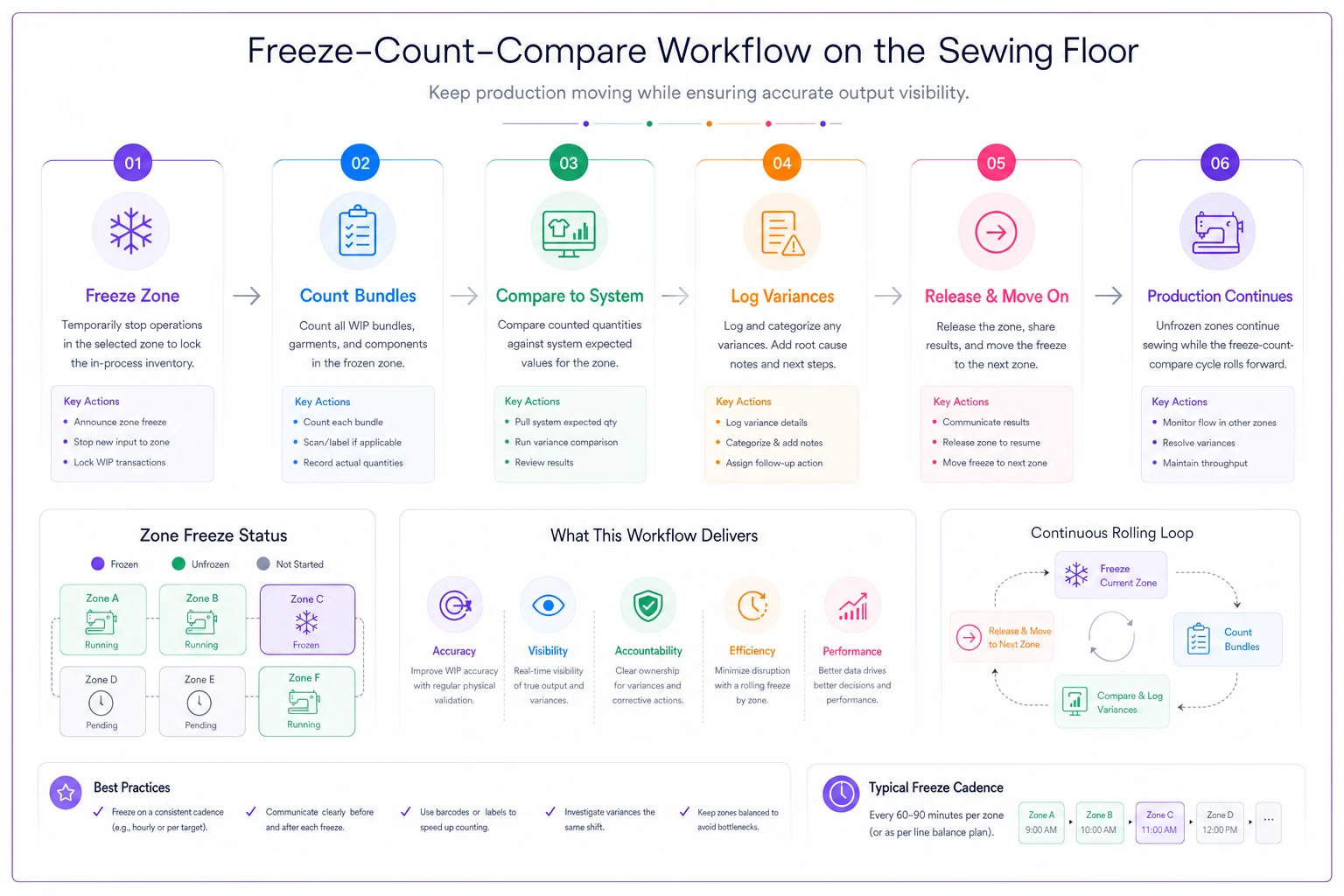
Operators barely notice the short freezes, but the routine forces regular checks where variance accumulates fastest.
Sample count form
Keep it dead simple. A form nobody fills out is worse than no form.
WIP CYCLE COUNT — [DATE] — [COUNTER NAME] SKU: Style desc: Zone: [ ] Cut/bundled [ ] Sewing [ ] Rework [ ] Finishing [ ] Packed Physical count: System expected: _ Variance (phys - sys): _ Variance %: _ Notes (bundle ticket #s, obvious causes): ____
The variance percentage line matters more than the raw number. A 20-unit gap on a 2,000-unit run is noise. A 20-unit gap on an 80-unit run is a real problem. Percentage forces the counter to think about scale rather than just reacting to the size of the gap.
Variance triage — deciding what to chase
Not every variance deserves investigation. Chasing a 3-unit discrepancy across the floor wastes more labor than the units are worth. Set a triage threshold and route accordingly.
-
Under 2% or fewer than 5 units — log and ignore. Normal miscount and bundle-splitting noise.
-
2–5% — note it, watch it. Same SKU drifting the same direction twice in a row? Escalate.
-
Over 5% or a repeated pattern — triage now.
When you do triage, work backward through the zones in this order, because that's where WIP variance usually hides:
-
Rework / hold zone first — units marked done but physically stuck
-
Bundle ticket mismatches — a bundle logged as 40 that was actually cut at 36
-
Uncounted scrap / defects — pieces pulled and discarded without a scrap log
-
Double-scanned or missed scans at zone transitions
A typical example: a factory with a persistent negative variance on a knit top — physical count running about 8% short. The rework zone is clean, bundle tickets look fine. Then the cutting log shows bundles cut at 42 while the sewing floor was ticketing them as 40, treating two pieces per bundle as extras and setting them aside. Over a 1,500-unit run, that's a lot of "extra" pieces floating loose with no home in the system.
Fast corrective actions
Once you've found the cause, the correction should take minutes, not a meeting:
-
Bundle miscount → correct the ticket, adjust system quantity, add a cut-verification step at the cutting station for that SKU
-
Rework backlog → force a disposition decision on held units same-day (repair, downgrade, scrap) so they stop hiding in limbo
-
Missing scrap log → backfill the scrap entry, retrain the operator who pulled the pieces
-
Scan gap at a zone edge → assign one person to own scans at that transition for the rest of the run
The corrective action that pays off most is also the smallest: forcing daily dispositions on the rework zone. In most small factories, the single biggest source of WIP variance is units pulled for a defect and then left sitting, unassigned, for days. Clear that zone every day and half your variance disappears.
When this routine makes sense — and when it doesn't
When it makes sense: you're running a live cut/sew floor, you have more than a handful of active SKUs, and full physical counts are disruptive enough that you keep skipping them. The velocity-banded, zone-based approach is built exactly for that situation.
When it's overkill: if you're a tiny operation running one or two styles at a time on a single sewing line, just count everything on Friday. The velocity banding only earns its complexity once you've got enough SKUs that counting them all is genuinely painful.
Who should not rely on this alone: if your bundle tickets and cut logs are unreliable at the source, no counting cadence will help. Reconciliation compares physical reality against your records — if the records are garbage going in, you'll just be confirming garbage faster. Fix the input discipline first. A basic materials and bundle logging practice, like the approach in this materials traceability log for teams without full systems, is the foundation this routine sits on top of.
A real scenario
A small contract factory doing knit basics — around 12 active SKUs, roughly 6,000 units a week through the floor — was doing full counts quarterly and running blind in between. Their inventory system and physical reality had drifted so far apart that they'd double-ordered fabric twice in one season and short-shipped a customer once because units marked "complete" were stuck in rework.
They switched to the velocity-banded routine. Top four SKUs counted every two or three days, everything else on a rotation. The daily rework-disposition rule got enforced by the floor supervisor. Within about six weeks, WIP variance on fast movers dropped from the 9–12% range down to under 3%. The rework zone, which used to hold 200+ units of unassigned WIP at any given point, was running closer to 40–50. No new software, no new hires. Just counting the right things more often and forcing decisions on the pile that was hiding the losses.
Where lightweight tooling actually helps
You can run this entirely on paper forms and a spreadsheet, and plenty of small factories should start exactly there. But once the routine is established, the manual friction shows up in two places: reconciling counts against system quantities by hand, and spotting repeated variance patterns across weeks.
That's where an operational platform earns its place — not by counting for you, but by holding expected-quantity numbers per zone, flagging when the same SKU drifts the same direction twice, and keeping count history visible instead of buried in a stack of forms. AI-assisted operational software can watch that variance history and surface a quietly drifting SKU before it turns into a reorder mistake — which is exactly the kind of signal worth building into a broader visibility model for small apparel manufacturers. The counting discipline is yours. The pattern-catching is what's worth automating.
Either way, the core idea holds: stop trying to count your whole floor at once, count by how fast things actually move, freeze one zone at a time, and force a decision on the rework pile every single day. That's a routine you can actually keep — which beats a perfect count you never run.
Ready to tailor your apparel operations?
Join 500+ fashion brands using GoTailo to accelerate product launches, reduce waste, and improve supplier collaboration.