


Most fashion brands don't buy software in a logical order. They buy whatever caught fire first. The sample room was a disaster, so they bought a PLM. Then a wholesale account demanded EDI, so they bolted on something. Then inventory got messy, so a 3PL forced a WMS integration they didn't fully understand. Three years later there are six systems, four of which don't share data, and a production coordinator spending half her week copy-pasting between them.
This guide is the version nobody hands you when you're small: a category-by-category breakdown of the SaaS tools for fashion production that actually matter — who uses each one, what features to insist on, what they must integrate with, and the part most people skip entirely — when each one actually becomes worth the money and maintenance overhead.
The guide closes with a recommended build order (minimal viable stack first, growth stack later) and an integration checklist you can hand to any vendor before signing.
How to read this taxonomy
Before the categories, two rules that will save you from the mess above.
Rule one: buy for the stage you're in, not the stage you want to be in. A 12-SKU brand doing three drops a year doesn't need a full ERP. It needs spreadsheet discipline and maybe two focused tools. Buying heavy early just means paying for seats and configuring modules nobody opens.
Rule two: integration is a feature, not an afterthought. The single most expensive mistake small brands make is choosing tools that store the same data in different shapes. If your PLM calls it styleid and your ERP calls it SKU and your WMS calls it itemnumber, someone becomes a human API. That someone usually quits.
1. PLM (Product Lifecycle Management)
What it actually does: Holds your tech packs, BOMs, color and material libraries, grading, sample tracking, and sign-off history. It's the source of truth for what the product is.
Eliminate delays in your fashion production cycle.
GoTailo helps you manage designs, orders, and inventory effortlessly, keeping production on schedule.
- Centralized order and inventory management
- Real-time supplier communication
- Integrated production scheduling
No credit card required
-
Designers (building tech packs, revising specs)
-
Technical designers and patternmakers (grading, fit comments)
-
Sourcing and production managers (BOM costing, vendor packages)
-
Sometimes the founder early on, doing all of the above
Core features to require:
-
Versioned tech packs with sign-off audit trail — who approved what, when
-
Structured BOM with placement, consumption, and supplier fields
-
Color and material libraries reusable across styles
-
Sample request and status tracking (proto → fit → PP → TOP)
-
Comment threads attached to specific measurements or components, not just a general chat box
Integration points:
-
Downstream to ERP/PO system
approved BOMs and costs must flow into purchasing without re-entry
-
Downstream to inventory
style/color/size structure should match what the WMS expects
-
Upstream from design tools
image and spec imports (Illustrator exports, CLO/3D files where relevant)
When it becomes necessary: Once you're running more than roughly 15–20 active styles a season across more than one factory and tech-pack versions start getting confused. Below that, a well-governed shared drive with a strict naming convention can hold. The breaking point is usually when a factory cuts off the wrong version of a tech pack and you eat the rework cost.
> Pattern worth noting: Brands often buy PLM for the tech-pack storage and completely ignore the BOM costing side. That's backwards. The BOM is the part that connects to money. If the PLM's BOM data can't export cleanly into your costing and PO flow, you've bought a fancy filing cabinet.
2. Costing & Pre-Production Planning
What it does: Turns the BOM plus labor, overhead, freight, duty, and sampling into a landed cost — and lets you run scenarios when a fabric price moves or an MOQ changes.
-
Production and sourcing managers
-
Founders watching margin
-
Finance, once there's actually a finance person
Core features to require:
-
Full cost build-up
materials, trims, labor, rework allowance, freight, duty, sampling amortization
-
Scenario toggles (what happens to margin if the mill raises price 8%?)
-
Currency handling if you source overseas
-
Target-margin back-solving
given a retail price, what's the max FOB?
Integration points:
-
Upstream from PLM
pull BOM quantities and material costs directly
-
Downstream to PO system
approved cost becomes the committed PO value
-
Sideways to finance
standard cost vs. actual cost reconciliation
When it becomes necessary: The moment you're making costing decisions faster than a spreadsheet can stay version-accurate. In practice, that's when more than one person edits costs and nobody can tell which file is current. A brand running costing in email attachments is already losing margin — small leaks across sampling, rework, and freight add up quietly.
This category also earns its keep when macro costs shift. When input prices cool or spike, you want to re-run landed cost across the whole line in an afternoon, not a week. The short-term moves in the July CPI cooling costing and production playbook are far easier to execute when your costing tool can re-price scenarios instead of forcing manual rebuilds across a pile of spreadsheets.
3. PO & Sourcing Management
What it does: Issues purchase orders, tracks confirmations, manages MOQs and ex-factory dates, and keeps the paper trail between you and the factory clean.
-
Production managers (issuing and chasing POs)
-
Sourcing teams
-
Factory coordinators on the vendor side
Core features to require:
-
PO issuing with size breakdown and delivery windows
-
Order confirmation and ex-factory date tracking
-
Partial shipment and split-delivery handling
-
Change-order history — price changes, quantity revisions
-
Supplier-facing access or export so factories aren't guessing
Integration points:
-
Upstream from costing
committed cost and quantities
-
Downstream to inventory/receiving
expected quantities so the warehouse knows what's arriving
-
Downstream to finance
PO → invoice → payment matching
-
EDI, if you sell wholesale
retailer POs coming in (850), shipment notices going out (856)
When it becomes necessary: As soon as you're managing more than a handful of concurrent POs across multiple factories with different lead times. The failure mode is subtle — nothing breaks loudly, you just slowly lose track of which orders are confirmed, which are late, and which had a quiet quantity revision the factory never flagged.
> Common mistake: Treating POs as one-and-done documents. Real POs mutate — quantities shift, deliveries split, prices get renegotiated mid-production. If your system can't track the history of a PO, your receiving team ends up reconciling against a number that no longer exists.
4. Supplier Communication & Collaboration
What it does: Centralizes the back-and-forth that otherwise lives in WhatsApp, WeChat, email threads, and someone's personal phone. Approvals, comments, document exchange, status updates.
-
Production coordinators
-
QA teams (inline comments, defect photos)
-
Factory contacts
Core features to require:
-
Threaded conversation tied to a specific style or PO, not a general inbox
-
Document and photo exchange with version control
-
Approval workflows — lab dips, strike-offs, PP samples — with timestamps
-
Searchable history (you need to find "what did we agree on fabric X in March" in seconds)
-
Mobile access for factory floors
Integration points:
-
Linked to PLM
approvals should attach to the style record, not float loose
-
Linked to PO system
production status updates tied to the actual order
-
Notification channels
email, and ideally the messaging apps your factories already live in
When it becomes necessary: This is the most under-bought category relative to how much pain it causes. The tipping point isn't SKU count — it's people count. Once more than two people on your side are talking to the same factory, approvals start falling through cracks. One person approved the lab dip verbally, nobody logged it, the factory proceeded, and the color's wrong.
The hidden cost is dispute resolution. When a factory ships the wrong thing and your only record is a scattered chat thread, you have no leverage. Centralized, timestamped approval history turns "he said/she said" into "here's the signed-off record."
This is one area where AI-assisted operational tools quietly pull their weight — summarizing long approval threads, flagging when a sample status hasn't moved in a certain number of days, surfacing the specific message where a decision was made. Not flashy, but it removes the "dig through 200 messages" tax that eats production coordinators alive.
5. Inventory & Warehouse Management (WMS)
What it does: Tracks what you physically have, where it is, and moves it through receiving, putaway, picking, and shipping. Handles raw materials and finished goods, ideally.
-
Warehouse and fulfillment staff
-
Inventory planners
-
Customer service checking availability
Core features to require:
-
SKU-level tracking with size/color matrix
-
Receiving against PO so discrepancies surface immediately
-
Lot/batch tracking if traceability matters
-
Cycle-count support
-
Multi-location if you use a 3PL alongside your own stock
Integration points:
-
Upstream from PO
expected receipts
-
Downstream to sales channels
real-time stock levels to Shopify, marketplaces, wholesale portals
-
3PL integration
if you outsource fulfillment, their system and yours must sync
-
To finance
inventory valuation
When it becomes necessary: Once stock lives in more than one place, or once overselling becomes a real risk across channels. A single-location brand selling only DTC can run on their e-commerce platform's native inventory longer than they think. The minute you add wholesale, a 3PL, or a second storage location, native inventory stops being enough.
6. ERP (the integration layer, eventually)
What it does: Ties finance, inventory, purchasing, and sometimes production into one system of record. For fashion, "ERP" usually means an apparel-specific ERP or a general ERP with an apparel layer bolted on.
Typical users: Finance, operations leadership — basically everyone touches it indirectly at some point.
Core features to require:
-
Native style/color/size matrix handling (generic ERPs that treat every size as a separate SKU are a nightmare)
-
Landed cost tracking
-
Multi-currency, multi-location
-
Strong API — because the ERP becomes the hub everything else connects to
When it becomes necessary: Later than most vendors will tell you. ERP earns its cost when the coordination overhead between your point tools exceeds what a unified system would cost to run. For most SMB brands that's somewhere past $5M–$10M in revenue, not before. Buying ERP too early is the classic over-build — you spend a year implementing a system your team isn't big enough to feed.
Quick-reference: category by growth stage
Quick-reference: category by growth stage
| Category | Minimal stage (early) | Growth stage | Primary users | Must integrate with |
|---|---|---|---|---|
| PLM | Shared drive + naming rules | Dedicated PLM | Design, tech design, production | Costing, ERP, WMS |
| Costing | Spreadsheet | Dedicated costing tool | Sourcing, finance | PLM, PO, finance |
| PO management | Spreadsheet / email | PO + sourcing platform | Production, sourcing | Costing, WMS, finance, EDI |
| Supplier comms | WhatsApp / email | Collaboration platform | Coordinators, QA | PLM, PO |
| Inventory/WMS | E-com native | Dedicated WMS / 3PL sync | Warehouse, planning | PO, sales channels, finance |
| ERP | Not yet | Apparel ERP | Finance, ops, everyone | Everything |
The table above maps each category to the minimal and growth stages, primary users, and required integrations.
Recommended build order
The sequence below causes the least pain, assuming you're starting lean and scaling.
Before anything else, nail your naming and data structure. How you identify a style, color, and size is the single decision that determines whether every future integration is easy or a permanent headache. Pick a structure and stop improvising around it.
-
Costing discipline — spreadsheet first, then a real tool. You can't make good decisions without reliable landed cost. Start with a locked, versioned spreadsheet; graduate to dedicated software when more than one person is editing it.
-
PO management. As factory count and order volume grow, get POs out of email. This is usually the first real software purchase that pays back fast.
-
PLM. Once tech-pack version confusion starts costing rework, formalize it.
-
Supplier communication platform. Add this the moment multiple people are talking to the same factories. Don't wait for a disaster to justify it.
-
WMS / inventory. When stock splits across locations or channels.
-
ERP. Last. Only when integration overhead actually justifies it.
Costing comes before PLM here deliberately — it goes against how most vendors sell. PLM is more exciting to demo, but costing is where the money leaks first.
Visualizing the sequence helps avoid the common buy-the-loudest-demo trap.
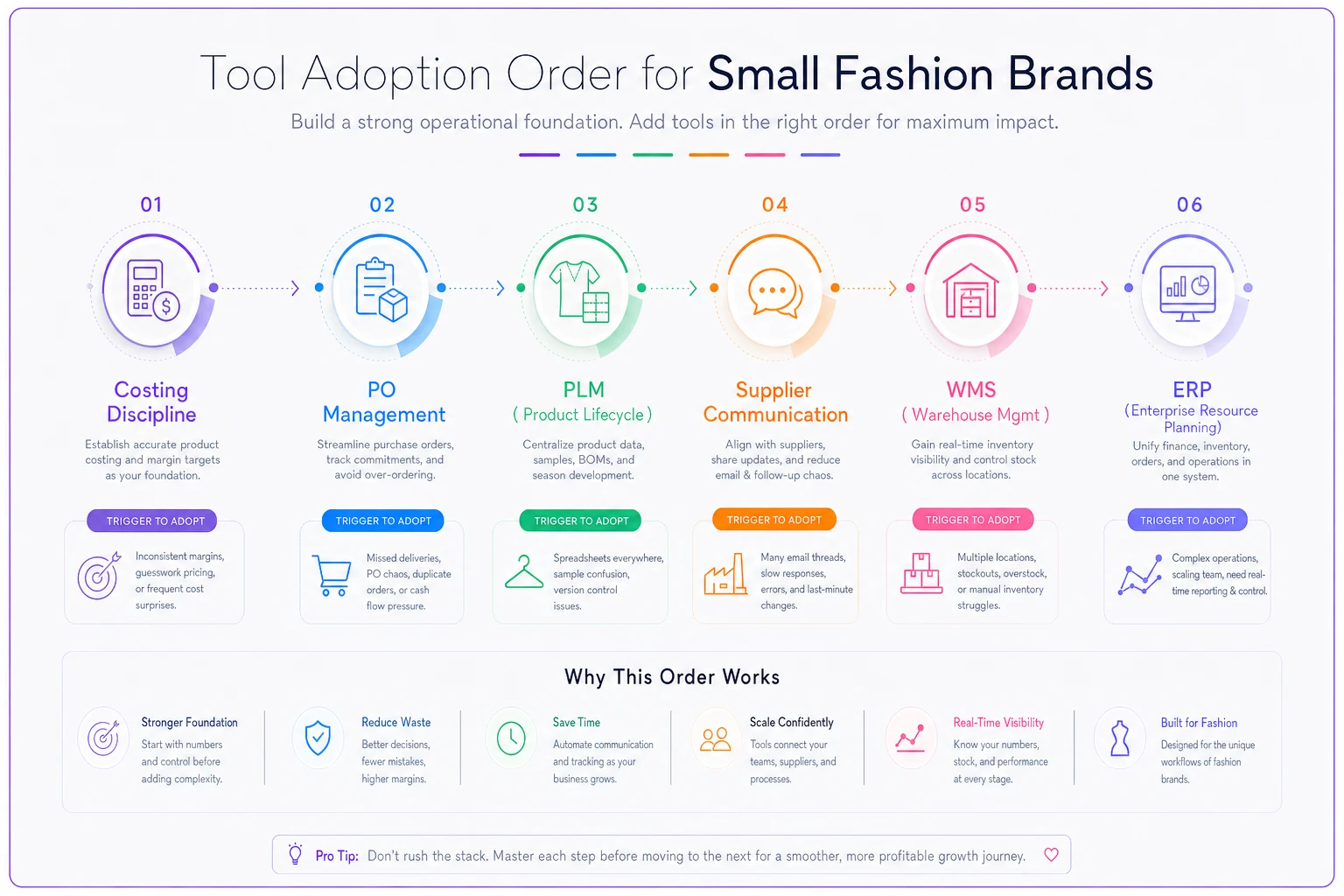
Costing comes before PLM here deliberately — it goes against how most vendors sell. PLM is more exciting to demo, but costing is where the money leaks first.
Integration checklist (hand this to any vendor)
Before signing anything, get written answers to these:
-
API availability Is there a documented REST API? Read and write? What are the rate limits?
-
Webhooks Can the system push events (PO confirmed, sample approved) or do you have to poll for updates?
-
File formats Does it import/export CSV, Excel, and ideally structured JSON? Can you map fields, or is the schema fixed?
-
EDI If you sell wholesale — does it support the documents your retailers require (850 PO, 856 ASN, 810 invoice)? Through a built-in connector or a third-party translator?
-
SSO Single sign-on support (SAML/OAuth) matters as your team grows — you don't want ten separate logins and no clean way to offboard someone who leaves.
-
Identifier mapping Can it map their ID fields to your master style/SKU structure? This is the one everyone forgets to ask.
-
Historical export If you leave in two years, can you get all your data out in a usable format? Ask now, not later.
A vendor that can't answer the identifier-mapping and export questions clearly is a vendor who will trap your data.
Ask vendors to show how they map their ID fields to your master style/SKU during a trial or demo.
A vendor that can't answer the identifier-mapping and export questions clearly is a vendor who will trap your data.
A realistic scenario
A contemporary womenswear brand — roughly $2M in revenue, around 60 active styles a season, three factories across two countries — was running everything on shared sheets and WhatsApp. Not chaos exactly, but the production coordinator was spending close to half her week reconciling: which tech-pack version shipped, which lab dip was approved, which PO quantity got quietly revised.
They didn't buy an ERP. They added two focused tools — a PO/sourcing platform and a supplier collaboration layer with searchable, timestamped approvals — and tightened their style-ID convention first. Within about two seasons, the coordinator's reconciliation time dropped by somewhere between a third and half, and "wrong version cut" incidents went from a recurring seasonal headache to near zero.
No big-bang transformation. Just the right two categories, in the right order, talking to each other.
That's the whole point of a taxonomy: it stops you buying the exciting tool and forces you to buy the one that fixes your actual bottleneck.
When *not* to add a tool
A few honest cautions worth keeping in mind:
-
Don't buy PLM if your real problem is costing. They feel related but they're not. Diagnose where the money and errors actually leak before you buy anything.
-
Don't buy ERP to fix a communication problem. ERPs are terrible at the messy, human back-and-forth with factories. That's a collaboration tool's job.
-
Don't integrate everything just because you can. Every integration is something that can break at 2am before a drop ships. Connect what reduces real manual work and leave the rest.
The brands that scale cleanly aren't the ones with the most software. They're the ones who added each category exactly when it started costing more not to have it — and made sure every new tool spoke the same language as the old ones. Start with your data structure. Cost things accurately. Get POs under control. Add the rest when the pain is real.
The brands that scale cleanly aren't the ones with the most software. They're the ones who added each category exactly when it started costing more not to have it — and made sure every new tool spoke the same language as the old ones. Start with your data structure. Cost things accurately. Get POs under control. Add the rest when the pain is real.
Ready to tailor your apparel operations?
Join 500+ fashion brands using GoTailo to accelerate product launches, reduce waste, and improve supplier collaboration.